

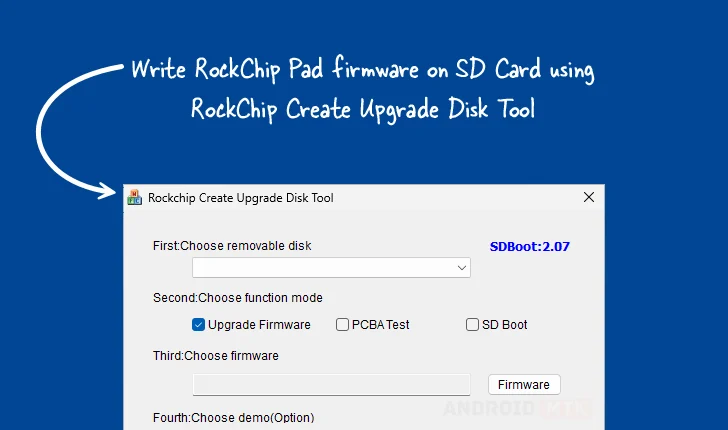
The Rockchip Create Upgrade Disk Tool stands as a crucial piece of software for developers, technicians, and advanced users working with hardware powered by Rockchip System-on-Chips (SoCs). This specialized Windows-based utility serves as the primary interface for writing essential Rockchip boot firmware directly onto external storage media, most notably SD cards. Its functionality extends beyond simple data transfer, offering sophisticated control over the underlying storage structure, which is fundamental for device initialization, system recovery, and custom software deployment across a wide array of embedded systems, single-board computers, and Android-based devices utilizing Rockchip processors. The ability to precisely manipulate the storage layout via the creation and management of both physical and logical partitions distinguishes this tool as indispensable for low-level hardware interaction.
The core utility of the Rockchip Create Upgrade Disk Tool revolves around establishing a reliable boot environment. In the ecosystem of Rockchip devices, the initial boot sequence often relies on firmware stored on external media like an SD card to load the operating system kernel or initiate recovery procedures. This tool facilitates the exact placement of these critical bootloader components, ensuring that the target device recognizes and executes the intended startup sequence, circumventing potential issues arising from corrupted internal storage or the need for initial system setup on bare-metal hardware.
Comprehensive Feature Set for Advanced Firmware Deployment
The robust feature set embedded within the Rockchip Create Upgrade Disk Tool is meticulously designed to address the varied demands of the development and maintenance lifecycle for Rockchip hardware. Each capability offers a specific mechanism to enhance reliability, flexibility, and control during the flashing process.
Precision Firmware Writing Capabilities: At its heart, the tool excels at the direct transmission of Rockchip boot firmware onto SD media. This process is highly specific, often requiring adherence to strict sector alignment and data structure protocols dictated by the Rockchip boot ROM. The utility abstracts much of this complexity, supporting various firmware image formats commonly employed in the Rockchip development sphere. Successful execution of this feature ensures the proper installation of the bootloader, which acts as the intermediary between the hardware and the operating system, making it a cornerstone for device recovery or initial hardware validation.
Granular Partition Management: A significant differentiator of this utility is its advanced capacity for storage segmentation. Users are empowered to define and manage both physical partitions—which correspond directly to defined sectors on the physical storage medium—and logical partitions, which allow for more flexible, software-defined organization within an extended partition structure. This capability is vital for scenarios requiring dual-boot setups, isolating recovery partitions, or dedicating specific areas for logging, configuration data, or operating system images. Effective partition management leads to optimized storage utilization and streamlined data access by the target device.
Versatile Multi-Mode Operation: Recognizing the diverse requirements across the product lifecycle, the tool incorporates several operational modes, significantly enhancing its utility beyond routine firmware updates. These modes typically include:
- Firmware Upgrade Mode: The standard mode focused on overwriting the necessary sectors for system booting and initial OS loading.
- PCBA Testing Mode: Essential during the manufacturing or quality assurance stages, this mode might facilitate the flashing of specialized diagnostic firmware onto the board assembly (PCBA) for thorough hardware validation before final enclosure assembly or software integration.
- SD Boot Options: Allowing configuration specifically for devices set to prioritize booting from the SD card, crucial for development kits or field service operations where internal storage might be inaccessible or intentionally blank.
This inherent flexibility allows a single tool to serve various stakeholders, from factory technicians to independent developers prototyping new applications.

Selective Data and Image Placement: Beyond flashing entire system images, the tool grants users the capacity for highly targeted data injection. This means specific binary files, configuration manifests, or driver packages can be written exclusively to pre-defined partitions or precisely calculated offsets on the SD card. This level of control is invaluable for debugging, applying incremental updates without touching the entire system image, or injecting proprietary application data directly into its designated storage space.
Real-Time Operational Oversight via Progress Monitoring: Flashing firmware, especially large images, can be a time-consuming process, and user confidence is maintained through transparent feedback. The utility incorporates a visual progress indicator, typically a progress bar, that dynamically reflects the status of the ongoing write operation or partition creation sequence. This monitoring ensures the user is aware of the remaining workload and prevents premature disconnection or interruption of the process, which could otherwise render the storage medium unusable.
Integrated Demo and Verification Support: For testing environments or quality control checkpoints, the inclusion of optional demo functionality proves advantageous. This feature allows technicians to quickly cycle through a predefined set of operations or verify that a specific configuration—such as partition layout and initial boot sequence—is correctly established without requiring a full, lengthy production flash sequence. It serves as a rapid validation mechanism for system integrity checks.
Robust Recovery and Restoration Mechanisms: A critical safety net embedded in the tool is its restoration capability. In the event that a flashing operation is interrupted, fails mid-write, or if a user needs to revert a device to a known working state, this feature provides a pathway for recovery. It aims to revert the SD card to a previous, verified state or, at minimum, ensure the storage medium is returned to a clean, recognized format, thereby mitigating data loss and simplifying the remediation of failed firmware updates.
Acquiring the RockChip Create Upgrade Disk Tool for Windows Environments
To support the widespread use of Rockchip platforms across various hardware configurations, the Create Upgrade Disk Tool is provided for native Windows operating systems, accommodating both 32-bit and 64-bit architectures. Access to the utility is facilitated through dedicated download repositories, ensuring users can obtain stable and verified versions of the software.
The availability across multiple versions reflects ongoing refinement and adaptation to evolving Rockchip hardware specifications and firmware standards. Current accessible versions include:
| Version | Download Link Identifier |
|---|---|
| 1.4 | Link (rc4ud) |
| 1.53 | Link (rc5ud) |
| 1.7 | Link (rc6ud) |
Users are advised to select the version most appropriate for their specific device model or the firmware they intend to deploy, although newer versions often maintain backward compatibility for established workflows. The consistent provision of these links underscores the community and developer reliance on this utility for maintaining the operational readiness of Rockchip-powered electronics. The utility remains a cornerstone for low-level system interaction, bridging the gap between compiled software images and the physical storage media of countless embedded systems worldwide.
