

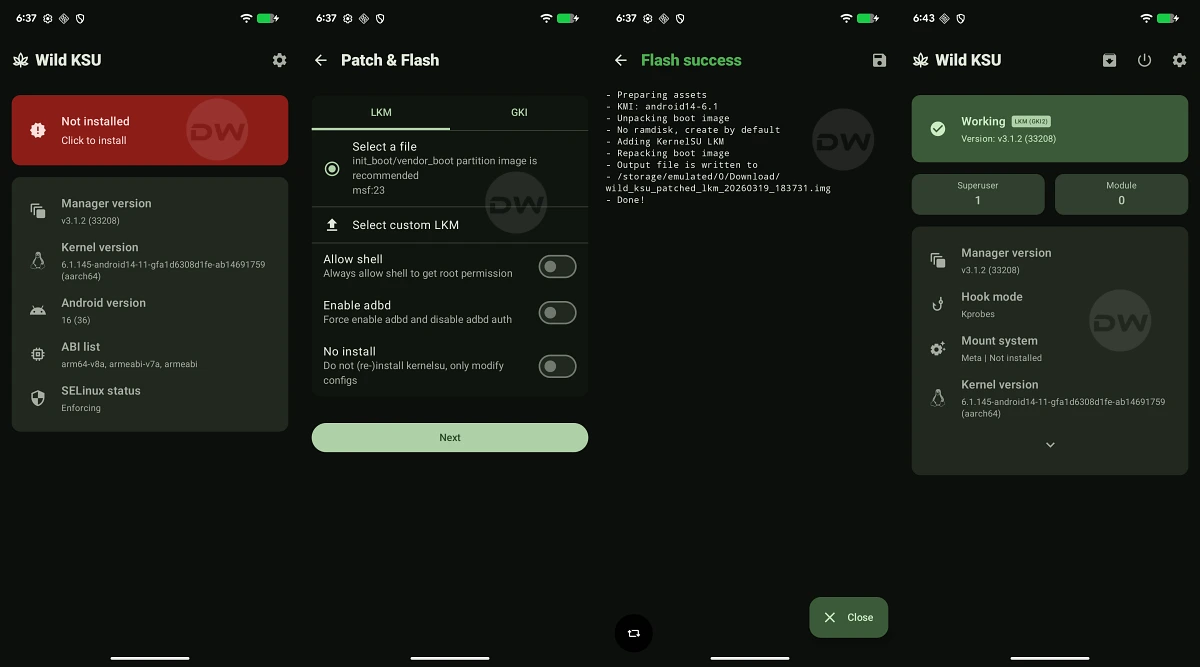
The landscape of Android customization has undergone a seismic shift in recent years, moving away from traditional system-partition modifications toward more sophisticated kernel-level interventions. At the forefront of this evolution is KernelSU, a revolutionary rooting solution that operates within the kernel space rather than the userspace. Building upon this foundation, the developer community has seen the emergence of refined iterations, most notably KernelSU Next and its feature-rich fork, Wild KSU. As a specialized implementation, Wild KSU aims to provide the same robust rooting capabilities as its predecessors while introducing a suite of "goodies" designed to enhance user control and system compatibility. This framework represents a significant milestone for enthusiasts seeking to gain administrative privileges on modern Android hardware without triggering the increasingly stringent security protocols implemented by Google and original equipment manufacturers.

Understanding the architecture of Wild KSU requires a grasp of how modern Android kernels are structured. Since the release of Android 12, Google has pushed for the adoption of the Generic Kernel Image (GKI). This standardization allows a single kernel binary to support multiple hardware platforms, facilitating faster security updates. Wild KSU leverages this architecture in two primary ways: through the GKI itself or via a Loadable Kernel Module (LKM). The LKM approach is particularly noteworthy as it allows the rooting framework to function as an elective component that interfaces with the existing kernel rather than requiring a total replacement of the system’s core. This modularity reduces the risk of hardware regressions and maintains better system stability.

The journey toward achieving root via Wild KSU is categorized into three distinct methodologies, each tailored to different levels of device support and user expertise. The most streamlined path involves the use of a custom kernel that has been pre-integrated with Wild KSU. This method is highly efficient, as it typically requires only a single flashable package to be installed via a custom recovery environment like TWRP or OrangeFox. However, the primary limitation of this approach is availability; not every Android device enjoys the support of a dedicated kernel developer who has incorporated Wild KSU into their builds. For devices lacking custom recovery support, users must often resort to more manual techniques involving the extraction and patching of system images.

Before embarking on the technical procedures, the prerequisite phase is critical. Rooting, by its very nature, involves bypassing factory-set security boundaries, which inherently carries risks. A comprehensive data backup is the first non-negotiable step. The process of unlocking a bootloader—a mandatory precursor to any kernel modification—triggers a mandatory factory reset, wiping all user data, including encrypted files and internal storage. Furthermore, users must acknowledge that such modifications may void manufacturer warranties and could, in rare instances of procedural error, lead to device instability or a "bricked" state where the hardware becomes unresponsive.

The first technical milestone in the Wild KSU deployment is the preparation of the workstation. This involves the installation of the Android SDK Platform Tools, which provides the necessary ADB (Android Debug Bridge) and Fastboot binaries. These tools serve as the primary communication bridge between a PC and the mobile device during the bootloader interface stage. Simultaneously, the mobile device must be prepared by enabling Developer Options. Within this hidden menu, users must toggle "USB Debugging" to allow ADB commands and "OEM Unlocking" to permit the eventual transition of the bootloader from a locked to an unlocked state.

Unlocking the bootloader is perhaps the most significant hurdle in the process. While some manufacturers, such as Google and OnePlus, provide relatively straightforward paths for unlocking, others implement strict token-based systems or outright forbid the practice. Once the bootloader is unlocked, the device’s integrity checks are relaxed, allowing the system to boot modified images that have not been digitally signed by the OEM. It is at this stage that the distinction between Android versions becomes paramount. For devices launched with Android 12 or older, the primary target for modification is the boot.img. Conversely, devices entering the market with Android 13 or later typically utilize a dedicated init_boot.img for their ramdisk operations. There are, however, notable exceptions like the Poco F5 and Nothing Phone 2, which, despite their modern software versions, still require the patching of the standard boot.img.

The core of the Wild KSU methodology lies in the patching process. Users must acquire the stock firmware for their specific device model and region to extract the correct boot or init_boot image. Once this file is transferred to the device’s internal storage, the Wild KSU Manager application takes over. The application analyzes the provided image and injects the Wild KSU kernel code directly into the binary. This modified file is then transferred back to the PC. The actual installation is performed in Fastboot mode, a low-level environment that precedes the loading of the Android OS. By executing commands such as fastboot flash boot or fastboot flash init_boot, the user replaces the factory-standard startup image with the version containing the Wild KSU hooks.

One of the primary advantages of Wild KSU over traditional rooting methods like Magisk is its stealth. Because the root permission logic resides within the kernel, it is significantly more difficult for "root-aware" applications—such as banking apps or high-security corporate tools—to detect the modification. While Magisk relies on complex "hide" lists and zygote-masking techniques, Wild KSU operates at a level that is essentially invisible to the userspace. This allows for a more seamless experience where the user can enjoy administrative control without constantly battling app compatibility issues.

Furthermore, Wild KSU’s implementation of root access is permission-based and granular. When an application requests root privileges, the request is intercepted by the kernel and passed to the Wild KSU Manager. The user is then prompted to grant or deny access. This ensures that no application can gain elevated privileges without explicit user consent, maintaining a high security standard even on a rooted device. Additionally, the framework supports the installation of various modules, allowing users to extend system functionality, tweak performance parameters, or customize the user interface with the same ease as older rooting solutions.

For users who wish to revert their devices to a factory state, the unrooting process via Wild KSU is designed to be as clean as possible. Since the modification is contained within the boot or init_boot image, restoring the original, untouched image file via Fastboot will effectively remove the Wild KSU hooks. This restores the device to its original security state, though it does not automatically re-lock the bootloader. Re-locking the bootloader is a separate step that should only be performed after ensuring that all system partitions are strictly official and unmodified to avoid a permanent brick.

In conclusion, Wild KSU represents the cutting edge of Android system modification. By moving the rooting mechanism into the kernel space, it offers a more robust, secure, and stealthy alternative to traditional methods. While the process requires a degree of technical proficiency—particularly regarding image extraction and Fastboot commands—the benefits of a kernel-based root are manifold. As Google continues to harden the Android ecosystem against unauthorized modifications, tools like Wild KSU ensure that the community of developers and power users retains the ability to truly own and customize their hardware. Whether through a custom-built kernel or the universal patching of GKI images, Wild KSU provides a versatile and powerful framework for the next generation of Android enthusiasts.
