

The landscape of Android custom development has undergone a seismic shift over the last half-decade. What was once a vibrant ecosystem of device-specific custom ROMs, tailored with surgical precision to individual hardware configurations, has largely transitioned into a more unified but complex era of Generic System Images (GSIs). This evolution is primarily a result of Google’s Project Treble, an architectural overhaul designed to modularize the Android OS framework from the low-level vendor implementation. While this was intended to speed up official manufacturer updates, it inadvertently became the lifeblood of the enthusiast community. For the Samsung Galaxy S25, S25 Plus, and S25 Ultra, this shift is more relevant than ever. At the current juncture, native AOSP-based custom ROMs for these flagship devices are non-existent, leaving GSIs like LineageOS as the primary gateway for users seeking a de-bloated, stock-Android experience.

Samsung’s latest flagship series represents the pinnacle of mobile hardware, yet it arrives at a time when the Korean tech giant is increasingly tightening its grip on software integrity. Reports from the developer community suggest that Samsung has begun experimenting with the removal of the "OEM Unlock" toggle in certain regions and firmware versions, a move that could potentially signal the end of an era for hobbyist modification. However, for those possessing hardware that still permits bootloader unlocking, the ability to flash a GSI remains a powerful tool. By utilizing a LineageOS GSI, users can bypass the heavy aesthetic and functional layers of One UI 7 or 8, opting instead for the minimalist efficiency that has made LineageOS the gold standard of the custom ROM world for over a decade.

Before embarking on the technical journey of flashing a GSI, it is imperative to understand the inherent trade-offs. Unlike a dedicated custom ROM, a GSI is designed to run on a multitude of hardware platforms. This "one size fits all" approach means that while the core OS will function, device-specific features—such as the Galaxy S25 Ultra’s advanced 200MP camera processing, specialized S-Pen gestures, or Ultra-Wideband (UWB) functionality—may suffer from reduced performance or total inactivity. Furthermore, the transition from Samsung’s proprietary One UI to a generic AOSP base often results in the loss of features like VoLTE or Wi-Fi calling, depending on the specific carrier and regional configuration. For many power users, however, the trade-off is worth the gain in privacy, speed, and customization.

The prerequisite for any successful modification of the Galaxy S25 series is the creation of a patched vbmeta image. Samsung’s implementation of Android Verified Boot (AVB) is notoriously stringent. The vbmeta (Verified Boot Metadata) partition acts as a cryptographic gatekeeper, ensuring that every stage of the boot process is signed and authorized by the manufacturer. When a user attempts to flash a custom recovery like OrangeFox or TWRP, or a custom system image like LineageOS, the AVB check fails, resulting in a "bootloop" or a "security error" screen. To circumvent this, one must flash a modified vbmeta file with specific flags—namely --disable-verity and --disable-verification—which instruct the bootloader to ignore the integrity of the system and vendor partitions.

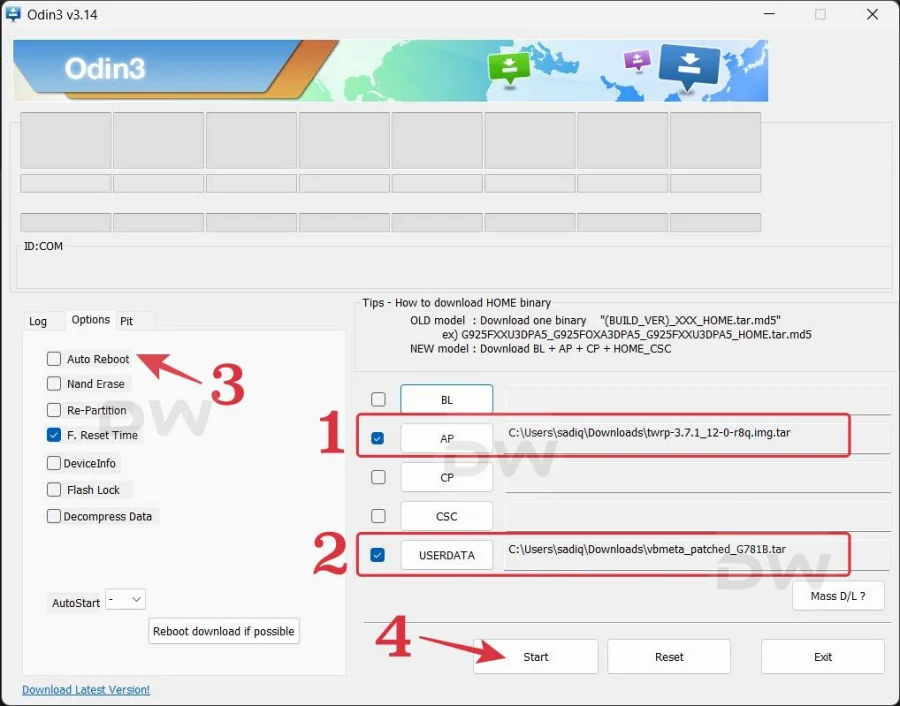
Creating this patched file involves extracting the stock firmware using a tool like 7-Zip to locate the BL or AP tar files. Once the original vbmeta.img is sourced, it is processed through a specialized script or tool to nullify the verification checks. This patched file is then repacked into a .tar format, making it compatible with Odin, Samsung’s proprietary flashing software. This step is non-negotiable; without a correctly patched vbmeta placed in the UserData slot of Odin, the device will refuse to boot any non-official software.

The choice of custom recovery is another critical decision point that depends heavily on the specific firmware version of the Galaxy S25. For users currently operating on One UI 7, which is based on Android 15, OrangeFox Recovery has proven to be a stable and feature-rich environment. It offers an intuitive UI and robust handling of the S25’s file encryption. However, as the development cycle moves toward One UI 8 and Android 16, the community typically gravitates toward Team Win Recovery Project (TWRP). The transition between Android versions often involves changes to how the /data partition is encrypted, and TWRP’s modular nature allows developers to update its decryption engines more frequently. It is essential to match the recovery to the Android base: OrangeFox for the current stable releases and TWRP for the bleeding-edge Android 16 builds.

The actual flashing process begins with the preparation of the host PC and the mobile device. The Galaxy S25 must have its bootloader unlocked—a process that involves entering the device’s "Download Mode" and following the on-screen prompts to "Device Unlock Mode." This action triggers a mandatory factory reset, wiping all user data and security keys. Once the bootloader is unlocked and the device has been initialized, the developer options must be re-enabled to ensure the "OEM Unlocking" toggle is visible and greyed out, confirming the unlocked status.

With the device in Download Mode, the user utilizes Odin on a Windows-based PC. The patched vbmeta tar file is placed in the USERDATA slot, while the custom recovery (OrangeFox or TWRP) is placed in the AP slot. It is vital to uncheck the "Auto Reboot" option in Odin’s settings. This prevents the device from immediately trying to boot back into the official system, which would likely overwrite the newly flashed recovery with the stock recovery. Once the flash is successful, the user must perform a manual hard-reboot using the Volume Down and Power keys, immediately transitioning to the Volume Up and Power combination to force the device into the custom recovery environment.

Inside the recovery, the process of installing the LineageOS GSI begins with a "Format Data" command. This is distinct from a standard factory reset; it removes the encryption layers that Samsung applies to the internal storage, allowing the GSI to write its own file structure. After formatting, the LineageOS GSI image file—typically an .img file—is transferred to the device via MTP or a microSD card. Since modern Samsung devices utilize a "Dynamic Partition" scheme, the recovery will prompt the user to select the target partition for the image. The user must select "System Image" to overwrite the stock One UI system partition.

Post-installation, a final "Wipe Cache/Dalvik" is recommended before the first boot. The initial boot sequence of a GSI can be lengthy, often taking several minutes as the OS builds its cache and initializes hardware abstraction layers. If the device successfully reaches the LineageOS setup screen, the user has successfully bypassed Samsung’s walled garden. However, the journey does not end there. GSIs often require "post-flash" tweaks. Within the LineageOS settings, there are usually "Phh-Treble" settings or "GSI Settings" that allow users to toggle fixes for common issues such as screen brightness flickering, audio routing errors, or signal strength reporting.

The future of custom development on the Galaxy S25 remains in a state of flux. While GSIs provide a functional alternative to One UI, they are a testament to the increasing difficulty of mobile modification. The community continues to work on "fixing" the generic nature of these images by developing "overlay" files that inject Samsung-specific hardware configurations into the GSI environment. These overlays can restore high-refresh-rate display settings or improve the accuracy of the under-display fingerprint scanner.

In conclusion, flashing LineageOS on a Galaxy S25, S25 Plus, or S25 Ultra is a sophisticated procedure that demands a deep understanding of Android’s modern partition structure and Samsung’s security protocols. It is a path reserved for those who prioritize software sovereignty over the polished, feature-heavy experience of One UI. As Samsung continues to evolve its security measures, the window for such modifications may narrow, making the current ability to run LineageOS on the S25 series a valuable, albeit complex, achievement for the global developer community. By following the rigorous steps of patching vbmeta, deploying the correct recovery, and properly initializing the GSI, users can ensure their flagship hardware remains a versatile tool for exploration rather than a locked ecosystem.
