

The landscape of Android customization has long been a playground for enthusiasts seeking to port features from one flagship device to another. A recent incident involving the Nothing Phone 2 and an unofficial port of OnePlus’s OxygenOS 16 has highlighted the intricate dangers associated with modern partition management. This case study serves as a critical examination of the "Super" partition architecture in Android, the limitations of emergency recovery tools in newer hardware ecosystems, and the strategic maneuvers required to rescue a device from the brink of a permanent brick.
The saga began when a power user attempted to revert their Nothing Phone 2 to its native Nothing OS firmware after a multi-day trial of an OxygenOS 16 port. Cross-brand firmware porting is a notoriously volatile endeavor, as it involves forcing software designed for specific proprietary hardware abstractions onto a foreign chipset configuration. While the OxygenOS port functioned adequately during the testing phase, the transition back to stock firmware triggered a cascading series of technical failures that exposed the complexities of the device’s logical partition structure.
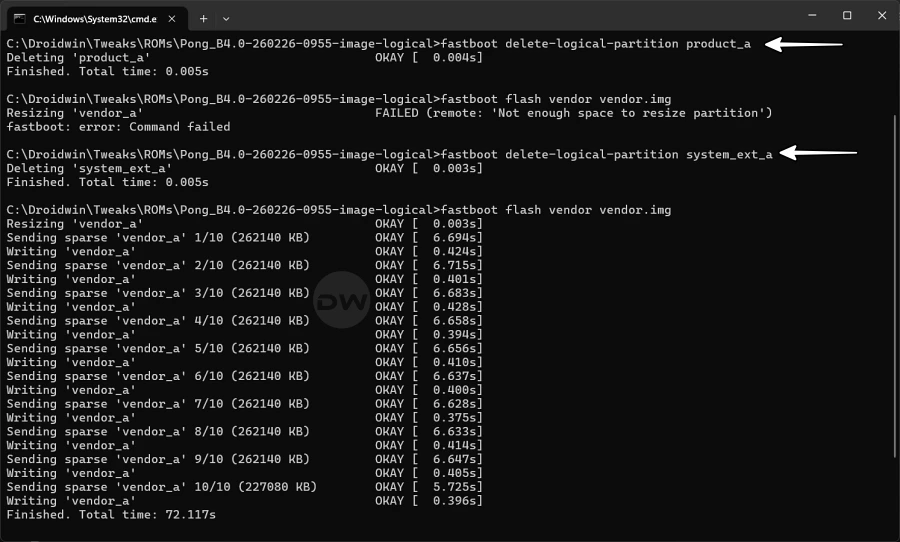
The initial point of failure manifested during the flashing process via Fastboot. The user encountered a critical error: "failed (remote: ‘not enough space to resize partition’)." To understand this error, one must look at the evolution of Android’s storage architecture. Starting with Android 10, Google introduced dynamic partitions, a system that allows the operating system to create, resize, or delete partitions during over-the-air (OTA) updates. These logical partitions—typically including system, vendor, product, and system_ext—reside within a massive physical partition known as "super." When a user attempts to flash an image that exceeds the allocated metadata size or the remaining physical space within the super partition, the system returns a resize error.
![How I Messed Up Product & System_Ext Partition [and then fixed it]](https://droidwin.com/wp-content/uploads/2026/03/How-I-Messed-Up-Product-System_Ext-Partition.webp)
In an attempt to bypass this spatial constraint, the user employed a common but high-risk workaround: manually deleting the product and system_ext partitions. In theory, removing these blocks frees up immediate space within the super partition, allowing the vendor.img to be flashed. The product partition typically contains OEM-specific apps and configurations, while system_ext houses non-core system extensions. While this tactic often works for Generic System Images (GSIs), which are designed to be lean, it creates a structural void that standard OEM flashing scripts are not programmed to handle.
The immediate result was a temporary success; the vendor.img flashed without further errors. However, this progress was deceptive. As the flashing script moved to the next stages, it attempted to populate the very partitions that had just been deleted. Because the product and system_ext partitions no longer existed in the device’s partition table, the script failed to find a target for the corresponding image files. The user attempted to circumvent this by modifying the flashing script to skip these two partitions entirely, hoping the device would boot with a stripped-down version of the stock OS.
This modification led to a catastrophic state known as the Qualcomm Crash Dump Mode. On many Android devices, a failure to mount essential logical partitions during the boot sequence triggers a kernel panic. For users of OnePlus or Oppo devices, this state is usually recoverable through the use of the MSM Download Tool or the OPLUS EDL (Emergency Download) Tool. These proprietary utilities interact with the device at the primary bootloader level via the Emergency Download Mode, allowing for a complete repartitioning and reflashing of the storage. However, the Nothing Phone 2 ecosystem currently lacks a publicly available, consumer-grade EDL tool. This absence of a "safety net" meant that if the device lost its ability to enter Fastboot Mode, it would effectively become a "brick"—a useless slab of glass and silicon.
Observation of the device’s behavior revealed a narrow "window of opportunity." Upon rebooting, the device would display the Nothing logo for several seconds before the kernel panic forced it into Crash Dump Mode. By timing a manual hardware key combination—simultaneously holding the Volume Down and Power buttons during the brief transition period—the user was able to intercept the boot process and force the device into Fastboot Mode. This victory was pivotally important; as long as the Fastboot interface remains accessible, the user maintains a line of communication with the bootloader, enabling further recovery attempts.
![How I Messed Up Product & System_Ext Partition [and then fixed it]](https://droidwin.com/wp-content/uploads/2026/03/cannot-flash-vendor-failed-remote-not-enough-space-to-resize-partition.webp)
With Fastboot access restored, the challenge shifted to rebuilding the missing partition table. The user hypothesized that a custom ROM, such as LineageOS, might act as a functional bridge. Unlike stock firmware scripts, which are often rigid and require every logical partition to be present and sized correctly, custom ROM installers are frequently designed with more flexibility. They often utilize their own recovery environments to dynamically reallocate space. The user initiated the flashing of LineageOS, a process that notably bypasses the specific proprietary checks that were causing the stock script to fail.
The successful boot into LineageOS confirmed that the hardware remained intact and that the primary issue was limited to the logical mapping of the super partition. However, the ultimate goal remained a return to the factory-standard Nothing OS. The presence of a functional LineageOS installation served to "reset" the device’s internal state to a degree, likely cleaning up the metadata corruption within the super partition that had initially prevented the stock firmware from fitting.
For the final recovery phase, the user reverted the modifications made to the stock flashing script, re-enabling the commands to flash the product and system_ext partitions. With the device in FastbootD mode—an extension of Fastboot that allows for the manipulation of logical partitions—the script was executed once more. This time, the system was able to successfully recreate the missing logical blocks and populate them with the necessary image files. The "not enough space" error did not return, suggesting that the intermediate step of flashing a custom ROM had forced the super partition to reorganize its metadata in a way that the stock script could finally utilize.
The device successfully completed the flashing sequence and booted into Nothing OS, marking the end of a high-stakes technical ordeal. This incident provides several vital lessons for the Android modding community. First, it underscores the dangers of the "delete-to-fit" strategy when dealing with dynamic partitions. While deleting logical partitions can resolve immediate space issues, it breaks the integrity of OEM flashing scripts which expect a specific partition layout.
![How I Messed Up Product & System_Ext Partition [and then fixed it]](https://droidwin.com/wp-content/uploads/2026/03/deleted-product-system_ext-to-flash-vendor-.webp)
Second, the case highlights a growing concern in the right-to-repair and enthusiast spheres: the reliance on proprietary recovery tools. As companies like Nothing emerge, the lag between hardware release and the availability of low-level recovery tools (like EDL programmers) creates a period of high risk for users who stray from the official software path.
Finally, the successful recovery via a "bridge ROM" (LineageOS) demonstrates a sophisticated understanding of how different software distributions interact with the underlying hardware. By using a more flexible, community-driven OS to stabilize the partition table, the user was able to create an environment where the more rigid stock firmware could finally be reinstalled. This narrative serves as both a cautionary tale and a technical roadmap for those navigating the increasingly complex world of modern Android firmware architecture. It emphasizes that in the absence of official recovery tools, a combination of precise timing, logical deduction, and the strategic use of community software remains the most effective arsenal for device resuscitation.
