

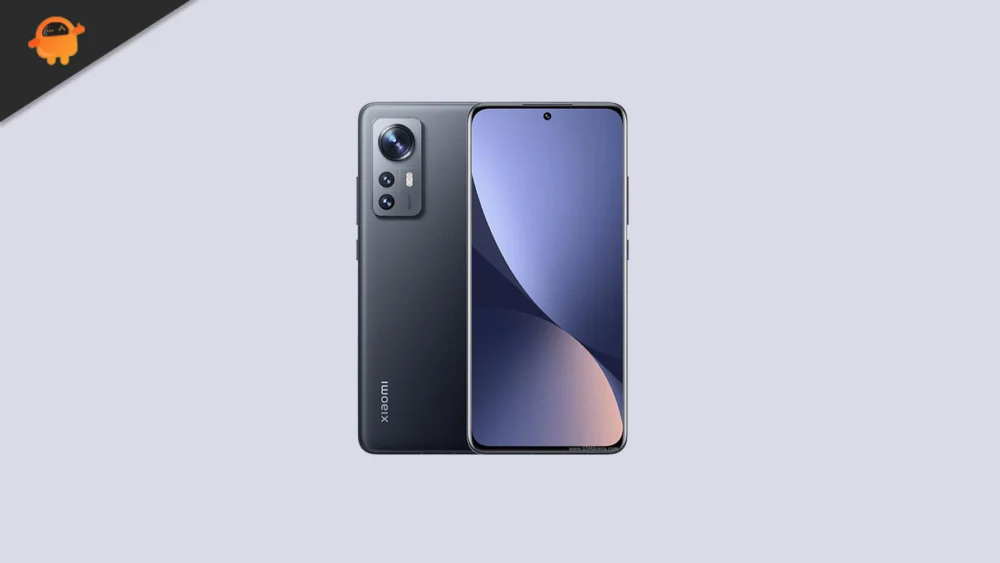
The landscape of mobile technology is defined by a relentless cycle of iteration, where hardware often outlives the software support cycles provided by original equipment manufacturers. The Xiaomi 12X, a device that carved out a significant niche as a premium compact flagship upon its release in late 2021, currently finds itself at a crossroads. While its internal specifications remains formidable, official software updates eventually reach a plateau. However, the enthusiast developer community has stepped in to bridge this gap. With the recent debut of Android 16 on Google’s flagship Pixel line, independent developers have successfully ported unofficial Android Open Source Project builds to the Xiaomi 12X. This transition offers users a rare opportunity to bypass the constraints of proprietary interfaces and embrace the latest advancements in the Android ecosystem, effectively modernizing a device that remains a favorite among fans of smaller form factors.
![How to Install Android 16 on Xiaomi 12X [Download Link]](https://www.getdroidtips.com/wp-content/uploads/2022/01/Xiaomi-12X.jpg)
To understand why the Xiaomi 12X is such a prime candidate for this upgrade, one must look at the enduring quality of its hardware. When it launched, it was marketed as a more accessible yet uncompromising version of the standard Xiaomi 12. It features a 6.28-inch AMOLED display that remains impressive by modern standards, boasting a 120Hz refresh rate and the ability to render 68 billion colors. With support for Dolby Vision and HDR10+, the visual fidelity of the 12X is competitive with many mid-range and even high-end devices released in 2024. Protecting this panel is a sheet of Corning Gorilla Glass Victus, a testament to the build quality Xiaomi intended for this series. Under the hood, the device is powered by the Qualcomm Snapdragon 870 5G chipset. While newer generations of the Snapdragon 8 series have since been released, the 870 is widely regarded by tech enthusiasts as one of the most stable and thermally efficient chips Qualcomm has ever produced. This efficiency ensures that the device can handle the increased demands of a new operating system like Android 16 without the overheating issues that plagued some subsequent processors.
The leap to Android 16 brings a transformative aesthetic and functional shift to the Xiaomi 12X, primarily through the introduction of Material 3 Expressive. This design philosophy is the next logical step in Google’s "Material You" journey. Rather than discarding the foundations laid by Android 13 and 14, Material 3 Expressive polishes the user interface to a high sheen. It introduces more dynamic animations that respond more fluidly to user touch, larger and more intuitive touch targets that improve accessibility, and bolder typography that enhances readability across various lighting conditions. For a device like the Xiaomi 12X, which lacks the massive screen real estate of "Ultra" or "Pro Max" models, these UI refinements are particularly beneficial, making the compact screen feel more expansive and easier to navigate. The update breathes new life into the interface, moving away from the aging visual language of earlier versions and aligning the 12X with the cutting-edge aesthetic of 2025.
![How to Install Android 16 on Xiaomi 12X [Download Link]](https://www.getdroidtips.com/wp-content/uploads/2022/01/Xiaomi-12X-300x169.jpg)
Beyond the visual overhaul, Android 16 is engineered for deep system optimization. It brings a wealth of under-the-hood improvements designed to maximize the potential of diverse hardware configurations, including tablets, foldables, and standard smartphones. On the Xiaomi 12X, these optimizations translate to better memory management and improved battery efficiency. Even though the device’s 4500 mAh battery is modest by today’s standards, the refined background process handling in Android 16 can help extend the time between charges. When a recharge is eventually needed, the hardware’s 67W wired charging capability—which can top up the battery in under 40 minutes—ensures that the user remains tethered to a wall outlet for as little time as possible. Furthermore, the inclusion of features like Wi-Fi 6, Bluetooth 5.2, and an under-display fingerprint sensor means the hardware remains fully compatible with the modern connectivity standards that Android 16 prioritizes.
However, the path to installing an unofficial AOSP build of Android 16 requires a disciplined approach to technical preparation. Unlike official over-the-air updates, which are automated and risk-averse, flashing a custom ROM is a manual process that demands a thorough understanding of the device’s software architecture. The first and most critical step is data preservation. Since the installation process requires a complete wipe of the device’s internal storage, creating a comprehensive backup of photos, documents, and application data is non-negotiable. This is followed by ensuring the device has sufficient power; a minimum of 50% battery life is recommended to prevent a catastrophic power failure during the sensitive flashing phase.
![How to Install Android 16 on Xiaomi 12X [Download Link]](https://www.getdroidtips.com/wp-content/uploads/2020/06/cmd-platform-tools.jpg)
The technical prerequisites involve setting up a bridge between the computer and the mobile device. This is achieved through ADB (Android Debug Bridge) and Fastboot binaries. These command-line tools are the primary means of communication for low-level system modifications. For the Xiaomi 12X, users must also ensure they have the latest Xiaomi USB drivers installed to facilitate a stable data connection. Perhaps the most significant hurdle is unlocking the bootloader. Xiaomi’s security protocols require an official request to unlock this component, a process that often involves a waiting period but is essential for granting the system permission to accept a non-factory operating system. Once the bootloader is unlocked, the installation of a custom recovery environment, such as TWRP (Team Win Recovery Project), becomes possible. TWRP acts as the interface through which the Android 16 ROM and the necessary Google Apps (GApps) packages are flashed.
The installation procedure itself is a sequence of precise actions. Once the device is booted into TWRP recovery, the user must perform a "Factory Reset" to clear the existing system partitions. Following this, the Android 16 ROM file is transferred to the device and flashed. A critical detail for those who rely on the Google ecosystem is the subsequent flashing of GApps. Most AOSP-based ROMs are distributed in a "vanilla" state, devoid of Google services to maintain a lightweight footprint. Flashing the GApps package immediately after the ROM, without an intervening reboot, ensures that the Play Store, Gmail, and other essential services are integrated correctly into the system.
![How to Install Android 16 on Xiaomi 12X [Download Link]](https://www.getdroidtips.com/wp-content/uploads/2020/08/twrp-custom-rom.jpg)
Upon the first successful boot, users will find themselves in a setup screen that feels brand new. While this is an unofficial build, early feedback from the developer community suggests that the core functionalities of the Xiaomi 12X—including the 50 MP OIS-stabilized camera, the Harman Kardon-tuned stereo speakers, and the various sensors—are largely operational. The 12X’s camera system, which supports 8K video recording, remains a high point of the hardware, and the transition to a cleaner AOSP-based Android 16 can sometimes even result in faster shutter response times compared to the original, more bloated software. However, as with any experimental software, users are encouraged to remain vigilant for minor bugs and to contribute to the development cycle by reporting issues with proper logs.
Ultimately, installing Android 16 on the Xiaomi 12X is more than just a software update; it is a statement of intent by the user to maintain control over their hardware. It allows a device from 2021 to stand shoulder-to-shoulder with the flagships of 2025 in terms of software features and design. By embracing the work of the developer community, Xiaomi 12X owners can enjoy a refined, expressive, and optimized mobile experience that pushes the boundaries of what their compact powerhouse can achieve. As long as the hardware remains capable, the spirit of open-source development ensures that the Xiaomi 12X will continue to be a relevant and exciting piece of technology for years to come.
