

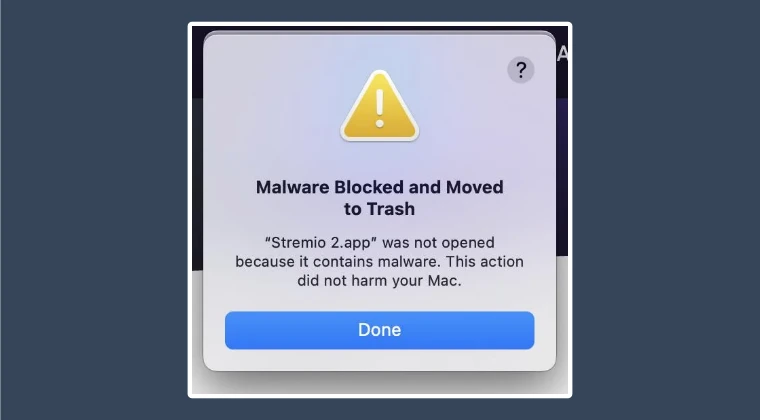
Apple’s macOS has long been heralded as a bastion of digital security, often standing as the gold standard for personal computing safety. Through a multi-layered defense system comprising Gatekeeper, XProtect, and the Notarization process, the operating system works tirelessly to ensure that only verified, safe software reaches the user’s desktop. However, even the most sophisticated systems are prone to occasional lapses, sometimes resulting in aggressive "false positives" that can paralyze legitimate software. Recently, a significant number of Mac users have encountered a particularly frustrating roadblock: a system-level notification stating that a trusted application has been blocked and moved to the trash due to detected malware. While this feature is designed to protect users from malicious actors, its recent application to legitimate software like the media streaming platform Stremio has highlighted a growing tension between automated security protocols and user autonomy.
The issue first gained widespread attention following a surge of reports across tech forums, social media platforms, and specialized Telegram channels. Users reported that upon attempting to launch or install certain third-party applications, macOS would abruptly terminate the process. Instead of the expected interface, users were met with a stark warning: "Stremio.app was not opened because it contained malware. This action did not harm your Mac." In many instances, the OS would automatically move the application to the Trash, effectively preventing any further interaction with the software. This phenomenon was not isolated to a specific version of macOS but appeared to affect a broad spectrum of users, suggesting a change in the way Apple’s backend security servers were interpreting certain developer certificates.
To understand why this happens, one must delve into the mechanics of macOS security. At the heart of the system is "Gatekeeper," a technology designed to ensure that only trusted software runs on a Mac. When a user downloads an app from outside the Mac App Store, Gatekeeper checks the software for a valid Developer ID certificate issued by Apple. Furthermore, since the release of macOS Catalina, Apple has required all software to be "notarized"—a process where developers submit their code to Apple’s automated service to be scanned for malicious content. If an app passes, the service issues a "ticket" that is attached to the executable, telling Gatekeeper that the software is safe.
The current crisis involving the "Malware Blocked" message typically stems from a breakdown in this cryptographic chain of trust. When macOS issues a report that an app contains malware, it is often because the developer’s certificate has been revoked or has expired, or because the notarization status has been flagged as compromised. In the case of Stremio and similar applications, the consensus among security researchers is that these are false positives—instances where the OS misidentifies a legitimate, safe application as a threat. This can happen if a developer inadvertently violates a minor policy in Apple’s Developer Program, leading to a blanket revocation of their signing privileges, which in turn triggers malware warnings for every user of that developer’s software.
Initially, many users attempted to circumvent this issue using traditional methods, such as navigating to the "Privacy & Security" section of System Settings. Typically, when macOS blocks an unidentified developer, an "Open Anyway" button appears at the bottom of the security pane. However, in these recent cases of malware flags, that option is conspicuously absent. Because the OS has classified the file as an active threat rather than simply an unverified one, it removes the standard override options, leaving users in a loop of frustration. The software is moved to the trash, and even if restored, it is immediately flagged again upon the next execution attempt.
Through rigorous investigation and community collaboration, a technical workaround has been identified that addresses the root cause: the invalid or revoked signature. The solution involves a process known as "ad-hoc signing." By stripping the problematic official signature and replacing it with a local, user-generated signature, the OS can be persuaded to treat the application as a locally developed script rather than a compromised external binary. This process utilizes the codesign utility, a powerful command-line tool built into macOS for managing code signatures.

To implement this fix, users must first ensure the application is located in their Applications folder and not in the Trash. Once the app is in place, the user must open the Terminal—the gateway to the underlying Unix subsystem of macOS. The specific command required is codesign -f -s -, followed by the file path of the application. In this context, the -f flag stands for "force," instructing the system to overwrite any existing signature, while the -s - flag tells the utility to sign the application with a "null" or ad-hoc identity. By dragging the application icon directly into the Terminal window after typing the command, the system automatically populates the correct file path, ensuring accuracy.
Once the command is executed, the user may be prompted to install Xcode Command Line Tools if they have not done so previously. This is a standard requirement for accessing developer-level utilities on a Mac. After the re-signing process is complete, the "malware" flag is effectively neutralized. When the user next attempts to open the application, they may still see a warning that the app is from an unidentified developer, but the critical "contains malware" block will be gone, replaced by the standard security prompt that allows the user to grant permission to run the software.
While this technical manual override provides a necessary escape hatch for users, it also raises important questions about the future of software distribution on the Mac. The "walled garden" approach favored by Apple offers undeniable benefits in terms of malware prevention, but it also creates a single point of failure. When a legitimate developer’s certificate is revoked—whether due to a clerical error, a policy dispute, or a minor security oversight—thousands of users are suddenly locked out of their tools. This creates a digital environment where software "ownership" is increasingly conditional upon the ongoing approval of the platform holder.
Furthermore, the reliance on Terminal-based solutions highlights a growing divide in user proficiency. While power users can navigate the complexities of code signing with relative ease, the average consumer may find the prospect of using command-line interfaces daunting or even dangerous. This creates a scenario where less tech-savvy individuals are forced to abandon legitimate software simply because the operating system’s automated guardrails have malfunctioned.
As we move forward, the tech community continues to advocate for more transparent communication from Apple regarding certificate revocations. If a popular application is flagged as malware, providing users with specific details—rather than a generic warning—could help distinguish between genuine security threats and administrative false positives. In the meantime, the codesign workaround remains the most effective tool in a Mac user’s arsenal for reclaiming control over their hardware.
In conclusion, the "Malware Blocked and Moved to Trash" error is a potent reminder of the complexities inherent in modern cybersecurity. While Apple’s intentions are rooted in the protection of the user, the execution can sometimes result in collateral damage to the user experience. By understanding the underlying mechanics of developer certificates and notarization, and by mastering the tools provided by the macOS environment, users can navigate these hurdles. The Stremio incident serves as a vital case study in digital resilience, demonstrating that while the system may stutter, the community’s ability to find and share solutions remains a cornerstone of the computing experience. As software continues to evolve, the balance between ironclad security and the freedom to run chosen applications will remain a central theme in the ongoing development of the Mac ecosystem.
