

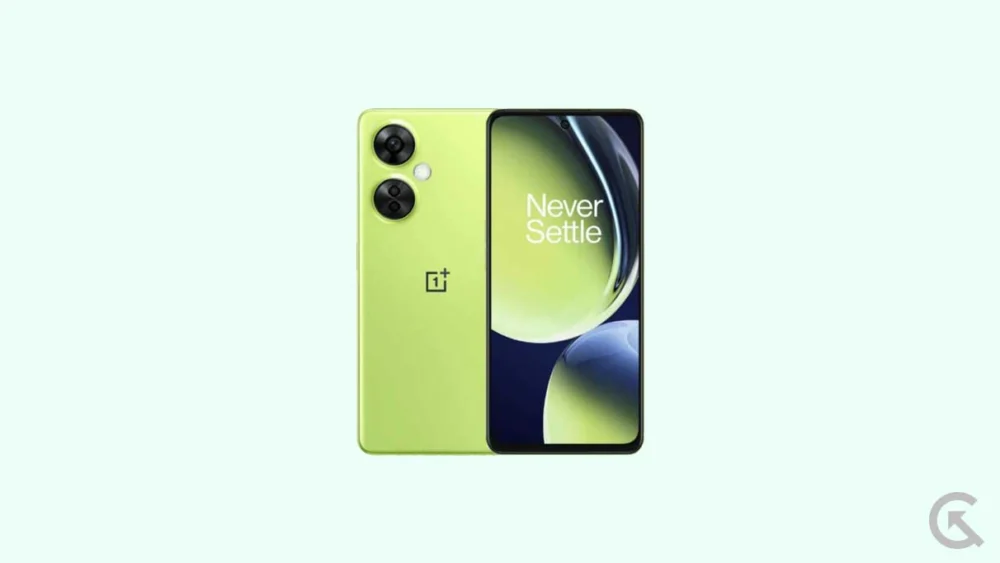
The smartphone industry operates on a cycle of rapid iteration, often leaving capable hardware behind as manufacturers pivot their software support toward newer flagship models. The OnePlus Nord CE 3 Lite, also marketed in North American territories as the OnePlus Nord N30, remains a formidable contender in the mid-range segment, yet its official software trajectory is tethered to the constraints of corporate update cycles. To circumvent these limitations, the enthusiast developer community has successfully ported the early iterations of Android 16 to this specific hardware. By leveraging the Android Open Source Project (AOSP) as a foundation, users can now transition their devices from the aging OxygenOS framework to the cutting-edge capabilities of Google’s latest operating system. This transition is not merely a cosmetic upgrade but a fundamental restructuring of the device’s software environment, designed to enhance longevity, privacy, and aesthetic fluidity.
![How to Install Android 16 on OnePlus Nord CE 3 Lite / Nord N30 [Download Link]](https://www.getdroidtips.com/wp-content/uploads/2023/04/OnePlus-Nord-CE-3-Lite-5G.jpg)
Technologically, the OnePlus Nord CE 3 Lite is an ideal candidate for such an ambitious software overhaul. At its core, the device is powered by the Qualcomm Snapdragon 695 5G chipset, a processor built on a 6nm architecture that balances energy efficiency with consistent performance. Coupled with 8GB of LPDDR4X RAM and a 6.72-inch IPS LCD panel capable of a 120Hz refresh rate, the hardware provides a sufficiently robust canvas for the demanding animations and system-level processes of Android 16. While the device originally shipped with OxygenOS 13.1 based on Android 13, the leap to Android 16 introduces a generational shift in how the hardware interacts with the user. The primary draw of this update is the introduction of "Material 3 Expressive," the next evolution in Google’s design philosophy. Unlike the initial rollout of Material You, which focused on color extraction and basic personalization, Material 3 Expressive emphasizes high-fidelity animations, bolder typographic hierarchies, and significantly more responsive touch targets. This design language is intended to make the interface feel less like a static grid of icons and more like a fluid, living organism that reacts to user intent with micro-interactions and refined haptic feedback.
Beyond the visual enhancements, Android 16 brings substantial under-the-hood optimizations that directly benefit the Snapdragon 695’s octa-core configuration. These include improved thread scheduling, which allows the OS to more intelligently delegate background tasks to efficiency cores while reserving the performance cores for foreground applications. For the OnePlus Nord CE 3 Lite user, this translates to reduced thermal throttling and extended battery life from the substantial 5,000mAh internal cell. Furthermore, the integration of 67W SuperVOOC charging support remains intact within these custom builds, ensuring that the convenience of rapid power replenishment is not sacrificed for the sake of software modernization. The device’s triple-camera array, headlined by a 108-megapixel primary sensor, also benefits from updated API support within Android 16, allowing third-party camera applications to access advanced image processing pipelines that were previously restricted.
![How to Install Android 16 on OnePlus Nord CE 3 Lite / Nord N30 [Download Link]](https://www.getdroidtips.com/wp-content/uploads/2023/04/OnePlus-Nord-CE-3-Lite-5G-300x169.jpg)
However, the path to installing an unofficial Android 16 build requires a meticulous approach to technical preparation. Before any software modification can occur, the user must establish a rigorous backup of all personal data. The process of flashing a custom ROM necessitates a complete wipe of the internal storage, including the data partition, which houses photos, messages, and application settings. Once data integrity is secured, the hardware must be prepared by ensuring the battery level is maintained above 50% to prevent a catastrophic power failure during the sensitive partition-writing phase. The technical bridge between the computer and the smartphone is maintained through ADB (Android Debug Bridge) and Fastboot binaries. These command-line utilities allow for low-level communication with the device’s bootloader, enabling the user to push system images and execute scripts that the standard user interface would otherwise block.
A critical prerequisite for this installation is the unlocking of the bootloader. In the context of OnePlus devices, the bootloader serves as a security gatekeeper that verifies the digital signature of the operating system. To install an unsigned, unofficial build of Android 16, this gatekeeper must be deactivated. It is important to note that unlocking the bootloader is a destructive process that triggers a factory reset and may affect the device’s warranty status or the functionality of high-security applications like banking suites due to the tripping of Google’s Play Integrity or SafetyNet protocols. Following the bootloader unlock, the installation of a custom recovery environment, such as TWRP (Team Win Recovery Project), is mandatory. TWRP provides a touch-based interface for managing partitions, allowing users to "flash" or install the Android 16 ROM file and the accompanying GApps (Google Apps) package. Since AOSP builds are typically "vanilla"—devoid of Google’s proprietary services—the separate installation of GApps is necessary for those who require the Play Store, Gmail, and Google Maps.
![How to Install Android 16 on OnePlus Nord CE 3 Lite / Nord N30 [Download Link]](https://www.getdroidtips.com/wp-content/uploads/2020/06/cmd-platform-tools.jpg)
The actual installation procedure follows a logical sequence designed to ensure system stability. After booting into the TWRP recovery environment, the user must perform a "Clean Wash," which involves wiping the Dalvik cache, System, and Data partitions. This prevents "dirty flashing" issues, where remnants of the old OxygenOS firmware conflict with the new Android 16 files, often leading to "boot loops" or frequent system crashes. Once the partitions are prepared, the Android 16 ROM is installed from the device’s internal storage or via an ADB Sideload command from a connected PC. Immediately following the ROM installation, the GApps package must be flashed without a reboot in between. This sequence ensures that Google Play Services are integrated into the system partition correctly during the initial boot sequence.
The first boot after such a significant update is a resource-intensive process. The system must rebuild the ART (Android Runtime) cache and initialize new encrypted directories for user data. Users should expect a prolonged boot animation, sometimes lasting up to ten minutes, as the Snapdragon 695 configures the new software environment. Once the setup wizard appears, the OnePlus Nord CE 3 Lite effectively becomes a "Pixel-ified" version of itself, offering a clean, bloatware-free experience that prioritizes speed and Google’s vision of the Android ecosystem. Early reports from the developer community suggest that the core functionalities—including 5G connectivity, Wi-Fi 6, Bluetooth 5.1, and the side-mounted fingerprint sensor—operate with high stability in these early AOSP builds. While minor bugs in niche features like the FM radio or specific high-refresh-rate gaming modes may persist, the overall trade-off is often viewed as favorable by power users.
![How to Install Android 16 on OnePlus Nord CE 3 Lite / Nord N30 [Download Link]](https://www.getdroidtips.com/wp-content/uploads/2020/08/twrp-custom-rom.jpg)
In conclusion, the migration to Android 16 represents a significant milestone for the OnePlus Nord CE 3 Lite and Nord N30 community. By bypassing official manufacturer restrictions, users can enjoy the latest advancements in privacy controls, such as more granular notification permissions and enhanced photo picker security, alongside the aesthetic brilliance of the Material 3 Expressive design. This guide serves as a testament to the versatility of the Android platform, where hardware longevity is limited not by the physical components, but by the ingenuity of the global developer community. As Android 16 continues to mature, these unofficial builds will likely receive further optimizations, solidifying the Nord CE 3 Lite’s position as one of the most cost-effective and software-flexible mid-range smartphones available today. For those willing to navigate the technical complexities of bootloader unlocking and partition management, the reward is a device that feels brand new, operating at the absolute forefront of mobile technology.
