

The evolution of the modern smartphone interface has been defined by a relentless pursuit of user comfort and visual ergonomics. Among the most significant shifts in mobile UI design over the last decade has been the widespread adoption of "Dark Mode." Initially conceived as a tool for power conservation on Organic Light Emitting Diode (OLED) displays and as a means to reduce ocular strain in low-light environments, Dark Mode has become a staple of the Android ecosystem. However, despite the maturity of the platform, the automation of these themes remains largely tethered to the clock. Most Android devices allow users to toggle between light and dark themes based on a fixed schedule or the local sunrise and sunset times. While functional, this chronological approach ignores the immediate physical environment of the user. A person in a windowless, dimly lit room at noon is forced to manually toggle settings, just as a user in a brightly lit office at midnight might find a dark interface difficult to parse.

To bridge this gap between digital settings and physical reality, a more sophisticated method of theme management has emerged: sensor-driven adaptation. By leveraging the ambient light sensor—a hardware component present in virtually every modern smartphone—users can transition their device’s aesthetic based on the actual "lux" or light level of their surroundings. This ensures that the display remains legible and comfortable regardless of the time of day, responding instead to the specific lighting conditions of the immediate vicinity. The following exploration details the technical requirements, the utility of the "Adaptive Theme" application, and the nuanced setup processes required to achieve a truly context-aware mobile experience.
At the heart of this technological workaround is the distinction between screen brightness and ambient light sensing. While many users confuse the two, they represent opposite ends of the light spectrum in mobile computing. Screen brightness is the luminous output of the display itself, measured in nits. Ambient light, conversely, is the light entering the device from the external environment, measured in lux. The ambient light sensor, typically located near the earpiece or integrated beneath the display, constantly monitors these levels to facilitate "Auto-Brightness" features. By hijacking this data stream, third-party utilities can trigger system-level theme changes when the external light crosses a specific threshold.

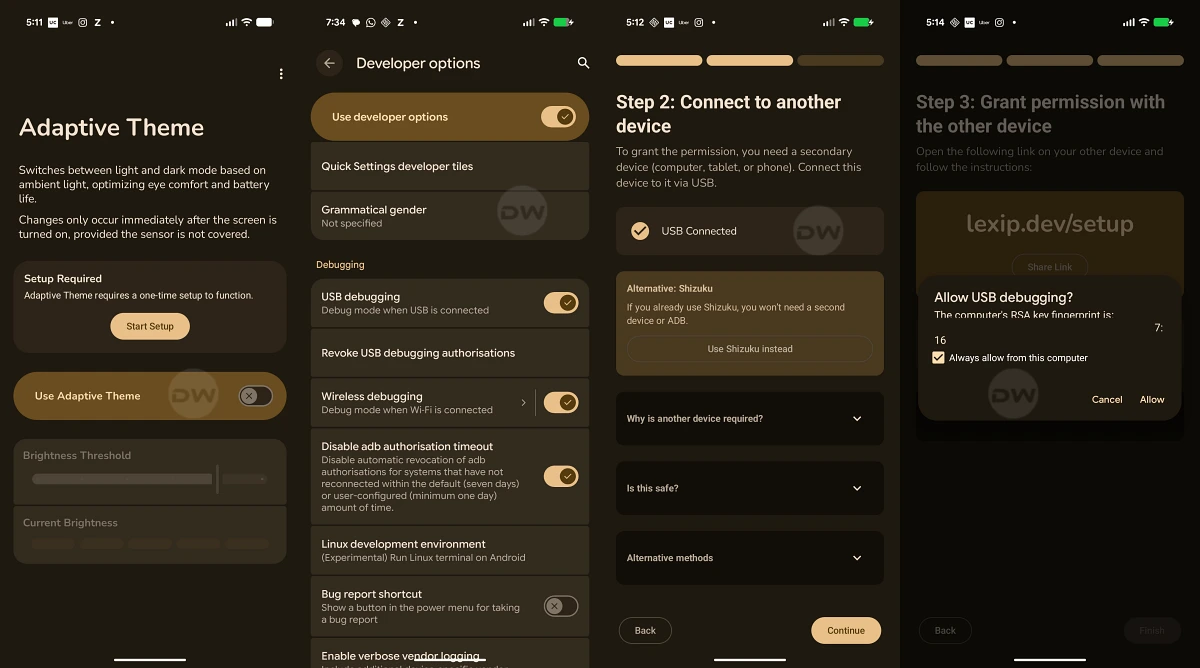
The primary tool for achieving this environmental synchronization is an open-source utility known as Adaptive Theme. Unlike many proprietary system tools, Adaptive Theme provides a transparent, customizable bridge between the sensor hardware and the Android system’s theme engine. However, because Android treats theme switching as a high-level system permission, the application requires specific authorization that goes beyond standard "Allow" prompts. To facilitate this, users must utilize either Shizuku or the Android Debug Bridge (ADB) to grant the necessary elevated privileges.
The choice between Shizuku and ADB depends largely on the user’s technical comfort and available hardware. Shizuku represents a modern breakthrough in Android customization, acting as a "root-less" bridge that allows apps to access system-level APIs by utilizing the device’s own developer options. The primary benefit of the Shizuku method is its convenience; once the initial wireless debugging handshake is established, the user can manage permissions entirely on the device without needing a secondary computer. The trade-off, however, is the requirement to install an additional management application, which some minimalists may find undesirable.

For those who prefer a cleaner device footprint, the ADB method remains the gold standard. ADB, a versatile command-line tool used by developers to communicate with a device, allows for the direct injection of permissions into the Android OS. While this method is inherently more complex—requiring a PC, a stable data cable, and a basic understanding of terminal commands—it is often viewed as more robust. It avoids the overhead of a secondary background service like Shizuku, though it lacks the user-friendly interface that Shizuku provides for ongoing permission management.
Regardless of the installation path, users must contend with a specific technical limitation inherent to how Android handles configuration changes. In the current implementation of sensor-based theme switching, the transition between light and dark modes is not instantaneous while the screen is active. Due to the way the Android OS manages resource "draw calls" and UI refreshing, a theme change triggered by a background sensor requires the device to be locked and then unlocked for the change to take effect globally across the system and all open applications. While this adds a momentary step to the process—roughly three to five seconds of interaction—it serves as a necessary buffer that prevents the UI from flickering or crashing if light levels fluctuate rapidly, such as when walking under a series of streetlights.

Once the permissions are secured and the application is active, the focus shifts to the calibration of the lux threshold. This is perhaps the most critical step in ensuring a seamless user experience. The application provides a slider to adjust the sensitivity, but for truly granular control, the "Custom Threshold" option is recommended. Light intensity is measured on a logarithmic scale; for instance, a pitch-black room might register at 0 to 5 lux, a well-lit living room at 150 lux, and an office environment at 300 to 500 lux. Direct sunlight can skyrocket to over 10,000 lux. For most users, setting a threshold between 300 and 400 lux provides the most logical breaking point. At this level, the device will maintain a light theme during the day or in bright indoor environments, but as soon as the user enters a darkened bedroom or a dim theater, the sensor will drop below the threshold, preparing the device to switch to dark mode upon the next unlock.
The practical benefits of this setup extend beyond mere novelty. From a health perspective, the sudden blast of a white-themed interface in a dark room can cause significant "blue light" exposure, which has been linked to the suppression of melatonin and the disruption of circadian rhythms. By automating the switch to dark mode based on actual darkness rather than a clock, the device becomes a more passive, health-conscious companion. Conversely, in high-glare environments like outdoor parks, a dark theme can often make text illegible due to reflections. The sensor-based switch ensures that the light theme—which provides better contrast in bright sun—is always active when needed.

Furthermore, the use of an open-source tool like Adaptive Theme highlights a growing movement within the Android community toward "de-Googling" and reclaiming control over hardware. While Google and various Original Equipment Manufacturers (OEMs) like Samsung and OnePlus have integrated many features into their respective "skins," they often leave out niche but highly functional logic like sensor-based theme switching to maintain a simplified user experience for the masses. The ability to use ADB or Shizuku to re-introduce these features is a testament to the flexibility of the Android kernel.
In conclusion, while the requirement to lock and unlock the device remains a minor hurdle, the transition to a sensor-driven theme logic represents a significant upgrade in the "intelligence" of a smartphone. It moves the device away from a rigid, time-based schedule and toward a reactive, environmental awareness. By following the protocols for Shizuku or ADB setup and carefully calibrating lux thresholds, users can ensure their eyes are protected in the dark and their screens are readable in the light, all without ever having to touch a toggle in the settings menu again. As mobile operating systems continue to evolve, it is likely that such context-aware features will eventually become native, but for the modern power user, the tools to achieve this future-leaning interface are available today.
